There are some higher-end tablets now which adjust themselves to the brightness, depending on where the sun is, and which angle the computer is being held at. This is important for people that use them outside, or if they use them for work. More and more businesses now are doing that, and many corporations are buying tablets for their employees, as they can contain all the information, and manuals that are needed in the operation of the business.
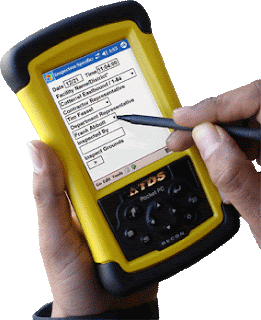
Not only does this save paper, it also saves time, energy, and you can put everything on one device. It also saves space when you travel, and these new tablets are quite light weight, durable, and soon to be flexible too. If you were leaving a restaurant at night, and walking down the block, and your tablets is acting as a GPS unit, the light should be somewhat dim so the brightness doesn't hurt your eyes.

If you are sunning on the beach and you have your tablet with you because you want to read an e-book, the screen should adjust to just the right background so it can be easily read. Just as the digital camera on the iPhone, or any of these other smart phones adjusts for the picture, the tablet PC should adjust the contrast, and brightness in real-time. The user should also be able to turn on or off this function as needed, because perhaps they are wearing sunglasses - thus they can self adjust it.
This is one innovation which would not cost much, perhaps only $20 worth of extra hardware, and it would hardly add any weight to the tablet, but it would make it so much more user-friendly, and therefore it would increase the number of uses and applications for this technology. There's no reason all businesspeople shouldn't have one, and all service companies, delivery companies, and even government inspectors should have one.

It will increase the efficiency and productivity of their work. That means they will be able to deliver services and products at a lower price, and the return on investment of the tablet will be well worth it. Meanwhile the manufacturers of these products will be able to sell them in bulk, and tens of millions of more units per quarter due to this extra automatic brightness control function. Please consider all this.

Not only does this save paper, it also saves time, energy, and you can put everything on one device. It also saves space when you travel, and these new tablets are quite light weight, durable, and soon to be flexible too. If you were leaving a restaurant at night, and walking down the block, and your tablets is acting as a GPS unit, the light should be somewhat dim so the brightness doesn't hurt your eyes.

If you are sunning on the beach and you have your tablet with you because you want to read an e-book, the screen should adjust to just the right background so it can be easily read. Just as the digital camera on the iPhone, or any of these other smart phones adjusts for the picture, the tablet PC should adjust the contrast, and brightness in real-time. The user should also be able to turn on or off this function as needed, because perhaps they are wearing sunglasses - thus they can self adjust it.
This is one innovation which would not cost much, perhaps only $20 worth of extra hardware, and it would hardly add any weight to the tablet, but it would make it so much more user-friendly, and therefore it would increase the number of uses and applications for this technology. There's no reason all businesspeople shouldn't have one, and all service companies, delivery companies, and even government inspectors should have one.

It will increase the efficiency and productivity of their work. That means they will be able to deliver services and products at a lower price, and the return on investment of the tablet will be well worth it. Meanwhile the manufacturers of these products will be able to sell them in bulk, and tens of millions of more units per quarter due to this extra automatic brightness control function. Please consider all this.
Lance Winslow is a retired Founder of a Nationwide Franchise Chain, and now runs the Online Think Tank. Lance Winslow believes writing 21,500 articles was a lot of work - because all the letters on his keyboard are now worn off.
Article Source: http://EzineArticles.com/?expert=Lance_Winslow
